
When I meet customers using OKTA as their Identity and Access Management, the following three questions often come up: (1) is Microsoft as good or better? (2) Can I save money by consolidating to Microsoft? and (3) How long does the migration take?
Is Microsoft as good or better than OKTA? Yes.
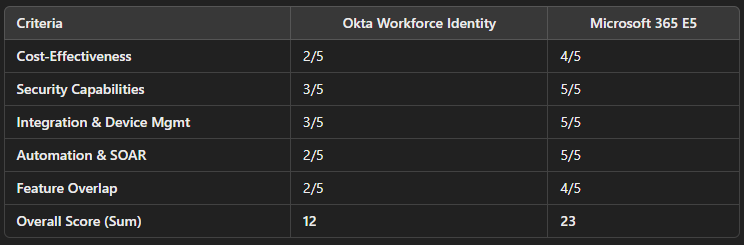
The table below summarizes the evaluation with a scoring system (1 = Poor, 5 = Excellent) for each criterion. All criteria are equally weighted. Each score is justified by the underlying capabilities and considerations discussed in subsequent sections.
Gartner ranks Microsoft as the vendor with the highest ability to execute features:
(source)
Can I save money by consolidating to Microsoft? Yes.
Okta’s identity services are an additional expense on top of Microsoft 365. For example, Okta charges roughly $2/user/month for basic SSO, plus $3/user for basic MFA; the adaptive security versions are about $5 and $6 respectively (source pathlock.com)
This means a full Okta SSO + adaptive MFA solution can cost $11 per user. In contrast, the entire M365 E5 Security bundle is $12/user as an add-on to M365 E3, but you get the full XDR Stack! (EDR, CASB, Email Security, all in a single unified console!) (source infusedinnovations.com)
For instance, one study found a 77% cost savings for a 5,000-user organization using M365 E3 + E5 Security compared to a mix of CrowdStrike, Okta, and Proofpoint for equivalent security coverage (source).
How long does the migration take? Not as long as you think.
How many apps do you have? Divide that by 10, and that is roughly the number of weeks it can take to migrate from OKTA to Microsoft. We have a special tool that Microsoft has provided us to streamline the migration effort, which can help us move even faster. We also qualify for Microsoft funding programs that can pay our consultants to do the work for you.
Security Considerations
Identity Protection & Risk Detection: Both Okta and Microsoft Entra ID provide risk-based authentication, but Microsoft’s capabilities are significantly more extensive. Microsoft Entra ID Protection has 28 built-in risk detection types (such as unfamiliar sign-in properties, impossible travel, leaked credentials, etc.), leveraging Microsoft’s vast telemetry (trillions of signals) and machine learning to assess user/sign-in risk. By contrast, Okta’s risk engine is less transparent about the number of detection signals – it primarily evaluates behavioral anomalies or IP-based reputation. Okta does offer adaptive MFA based on risk scores (e.g. network, device, location contexts) and can integrate with partner tools for enhanced threat signals, but it doesn’t natively match the breadth of Microsoft’s global threat intelligence which handles 78 trillion signals per day. In practice, Microsoft Entra Identity Protection will flag more diverse risk events automatically, while Okta requires additional effort and cost to pull in external partner signals.
Extended Detection & Response (XDR): Microsoft 365 E5 includes the Microsoft 365 Defender XDR suite, which goes far beyond identity. This suite covers: Defender for Endpoint (EDR), Defender for Identity (monitoring on-prem AD for threats), Defender for Office 365 (email and collaboration threat protection), and Defender for Cloud Apps (SaaS Security).
These tools work together to correlate threats across domains (identity, devices, email, cloud). Okta does not provide endpoint or email security – it would rely on third-party XDR solutions for those. In other words, with E5 you get an integrated XDR that can identify, for example, a malware-infected device and automatically prevent that device’s user from accessing corporate apps, something Okta alone cannot do. Okta’s contribution to security is mainly identity-centric (preventing unauthorized access via SSO/MFA and de-provisioning access quickly), but it doesn’t monitor for malware, phishing, or lateral attack patterns. The Defender XDR capabilities in E5 significantly bolster an organization’s security posture beyond authentication alone.
Automated Attack Disruption: Because Microsoft’s tools cover multiple attack vectors, they can also coordinate automated responses. Microsoft’s Automatic Attack Disruption feature (in preview/ignite 2024 announcements) is designed to contain active attacks in real-time by isolating compromised identities or devices across the ecosystem. For instance, if a user account is suspected to be compromised as part of a ransomware attack, the system can automatically suspend the account and isolate the device to stop the attacker’s progress. Okta’s platform, on its own, can lock an account after detecting anomalous behavior (zero-trust approach to suspicious logins), but it lacks the device-side response. It cannot quarantine a machine or cut off email phishing internally – those would require separate solutions. Thus, Microsoft E5 provides a more comprehensive active defense, automatically disrupting attacks across identity and devices, whereas Okta’s response is limited to identity containment (which, while important, addresses only one piece of an active threat).
Security Copilot (AI-Assisted Security): Microsoft has introduced Security Copilot, an AI-driven assistant for security analysts (available to customers of the Microsoft security stack for an additional fee). This tool uses generative AI on top of the aggregated data from Microsoft’s XDR and SIEM, helping to summarize incidents, suggest remediation, and even craft KQL queries. Okta currently has no equivalent AI security assistant. (Okta has begun integrating AI for threat protection in specific ways, but nothing like a broad incident copilot.) This means organizations on E5 can leverage cutting-edge AI to accelerate threat investigations and response, a capability missing from Okta’s offering.
Device Management (Intune vs. Okta): Microsoft 365 E5 (and E3) includes Microsoft Intune (part of Microsoft Endpoint Manager) for mobile device and PC management. Intune is tightly integrated with Windows – Windows 10/11 devices can be Azure AD joined and automatically enrolled in Intune without needing any third-party agent. Intune also manages iOS, Android, and macOS devices using native OS management frameworks. This means policy enforcement (like requiring compliant devices for access) works end-to-end with Azure AD Conditional Access. By contrast, Okta’s device management capabilities are limited. Okta did offer Okta Mobility Management (OMM), but that product has been end-of-lifed as of 2023 (Okta now encourages integrating with other MDMs like Intune, MobileIron, etc., for device compliance)
Okta’s current approach to device security is via Device Trust – ensuring that only devices managed by a trusted MDM or with Okta Verify can access certain apps. This still requires a separate device management solution (such as Intune itself or another MDM) to actually manage the device’s health and compliance. Also, for desktop devices, Okta’s device trust often requires installing an agent or certificate on the device to validate it, whereas Intune management is part of the OS onboarding. The key takeaway: Intune (with M365) provides a full-fledged, integrated device management and is built into Windows, whereas Okta alone cannot manage devices and must be paired with an MDM – introducing additional complexity and cost if one isn’t already in place. In our scoring, Microsoft gets full marks for integration largely due to Intune’s presence and the Windows integration, plus things like Windows Hello and Azure AD Join which create a smooth authentication experience. Okta, while it can integrate with Intune and even automate some device context via its APIs, is not an out-of-the-box device management solution.
Need help? We can move the first few apps and train your team how to move the rest! Contact us at Hello At PatriotConsultingTech.com
 The Cloud Technologist