
Guest post By Chris Lehr
Executive Summary
If you are a Microsoft 365 customer and you are seeing an uptick of spam and phish emails sent to your domain, but also from your domain that seem to be getting past your filters, you will want to see if this issue applies to you and determine the best approach to preventing these from occurring.
Background
Direct Send was introduced initially as ONE of three ways you could migrate your SMTP traffic to M365. Direct Send was the one that was free and easy, you just point your copiers/scanners at your MX record and BOOP – there’s your email. Easy.
Well, it’s been around for 10+ years and lots of customers utilize it. In April 2025, Microsoft announced that they were releasing a way to disable it in your tenant, and the entire Internet seemed to say “Wait, was there an exploit there?” Microsoft stated in that article:
“We are working on creating a report for Direct Send traffic that admins can use to get an overview of what traffic will be impacted.”
So, with the announcement of a way to block it and little revelation of how to audit this, those with malintent got right to it, and by mid-July 2025 attacks abusing Direct Send were on the rise. They all have the following hallmarks:
· Sender Domain and Recipient Domain are both your domains
· Failing SPF
· No DKIM signature
· Therefore, failing DMARC
There is an excellent writeup here at Varonis – one of the best writeups of the issue I’ve seen.
With attacks rising, Microsoft released a new blog entry on August 4th, 2025, and it has been edited, revoked temporarily and reposted due to confusion it caused. I hope to be helpful to Microsoft customers here and inclusive of all regardless of how you are configured.
Here is a flowchart as well as a written list on how to audit and block these sort of attacks, regardless of your configuration!
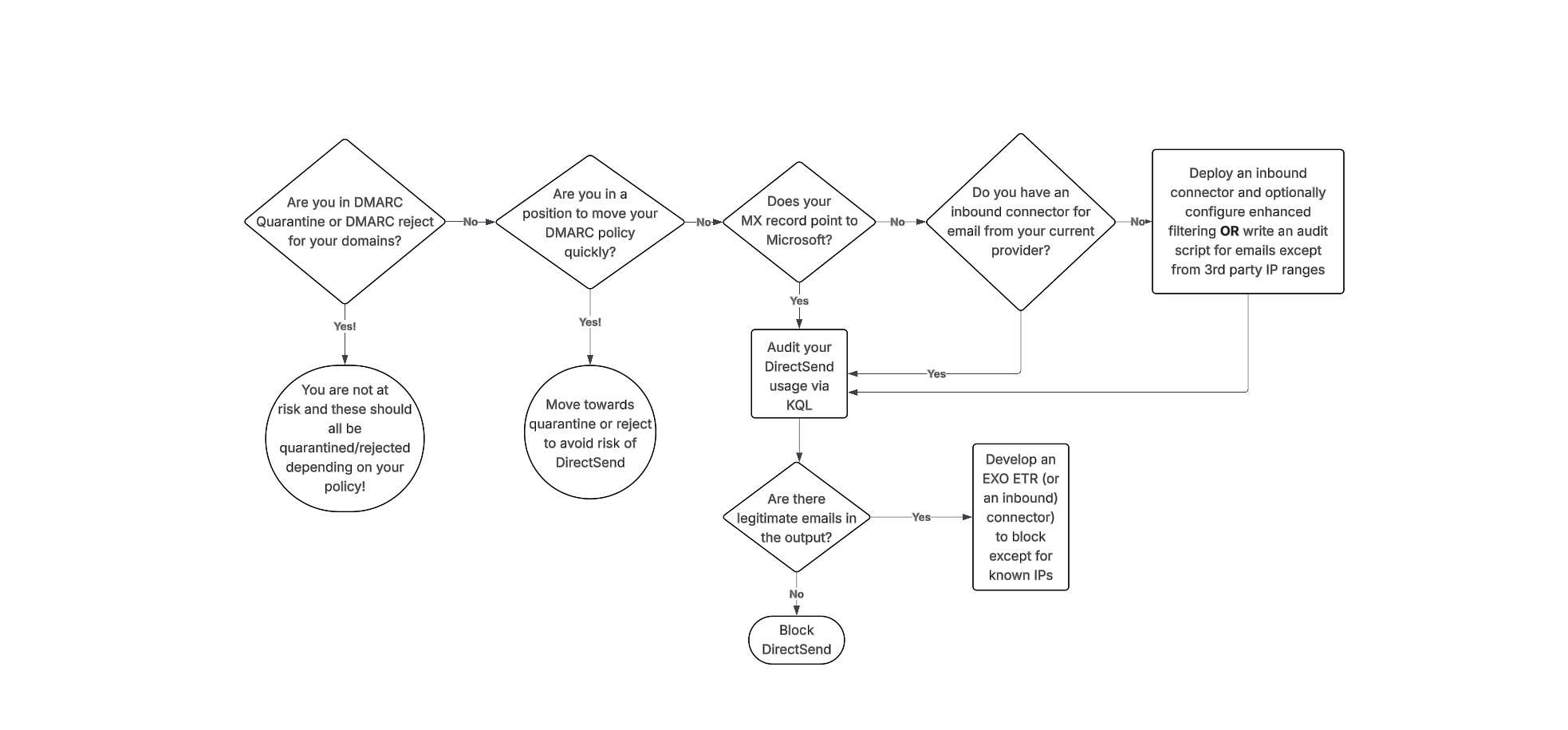
DMARC advancement
The best way to avoid issues with Direct Send abuse is to move your domains to p=quarantine or p=reject. However, if you’re not familiar with DMARC, you should NOT simply change this value – doing so could drastically impact the deliverability of emails that are not SPF and DKIM aligned. If you’re already performing DMARC aggregation, have been at p=none, and are making progress on alignment efforts, you might be able to complete that arduous task to get to p=quarantine and be out of the way of this risk. It’s important to note that this is a complex task – it takes some customers MONTHS of alignment effort!
Additionally, if your domain is set to DMARC quarantine or reject, you still might be at risk if you have any EXO ETRs that are setting SCL -1 or if you are allow-listing via IPv4 in connection filter – both of which essentially bypass DMARC protections by automatically marking mail as safe. More on this below.
Keep in mind that in your tenant, you also would want these settings enabled for DMARC enforcement (from AntiPhishing policy Actions)
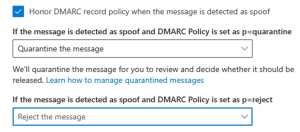
While achieving a DMARC p=reject state is a critical security milestone, Microsoft 365 introduces a specific nuance: the override (action=oreject).
Microsoft may override your DMARC policy in certain scenarios, such as when a DNS lookup fails, or when the SCL is set to -1 due to a misconfigured Exchange Transport rule (ETR), connection filter, or an allowlist. This allows unauthenticated emails (such as Direct Send) to be delivered even when they fail DMARC.
You can confirm if this override is occurring by inspecting the Authentication-Results header. If you see action=oreject, your reject policy was bypassed.
Example 1: SPF Error / Fail Open
Authentication-Results: spf=permerror … dkim=none … dmarc=fail action=oreject … compauth=fail reason=000
Example 2: SCL-1 Bypass
Authentication-Results: spf=fail … dkim=none … dmarc=fail action=oreject … compauth=none reason=451
If you already have your DMARC Record enforced then create the ETR below with a Priority of 0 (run first). This way, if the DNS lookup fails, or when the SCL is set to -1 in any other ETR rule, or any other reason, this rule will still block those direct send attempts.
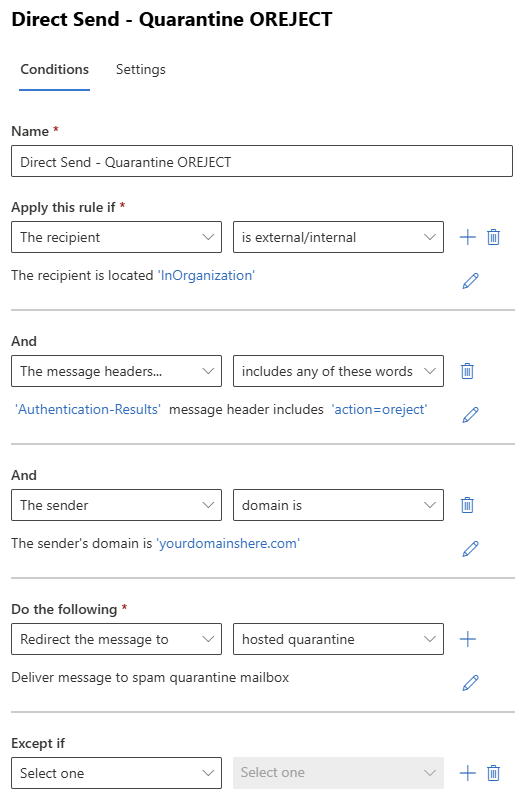
Auditing the Usage
For organizations wondering, “Are we seeing this threat/attack?” or “We saw one example, how many more are there?” – The Patriot team has collectively answered questions like these a LOT in the last couple of weeks and here is what we have developed to assist. Note, Explorer and KQL are MDO plan 2 benefits – Patriot HIGHLY recommends gaining access to these tools in general but being able to delve into your data like this is a solid reason to make it part of your budget soon.
If your MX points to Microsoft today, I recommend using this KQL:
EmailEvents
|where Timestamp > ago(30d)
| where EmailDirection == ‘Inbound’
| extend LeftPartSender = substring(SenderFromAddress, 0, indexof(SenderFromAddress, ‘@’))
| extend LeftPartRecipient = substring(RecipientEmailAddress, 0, indexof(RecipientEmailAddress, ‘@’))
| where LeftPartSender == LeftPartRecipient
| where isempty(Connectors) // not coming in on a connector
| where DeliveryLocation == ‘Inbox/folder’
| where parse_json(AuthenticationDetails) contains ‘fail’
| project Timestamp, RecipientEmailAddress, SenderFromAddress, Subject, NetworkMessageId, EmailDirection, Connectors, SenderIPv4
You may ask, why not just compare the sender and recipient domain name? In some cases, we have observed the sender domain using a MOERA which is a valid email alias whereas the recipient is their primary SMTP alias. We suspect this was done to evade the exact comparison, so we updated the query above to look for the alias matching on sender and recipient.
If your MX points to a 3rd party today, and you route email inbound to MSFT via an inbound connector, I recommend using this KQL (this is from the MSFT article)
EmailEvents
| where Timestamp > ago(30d)
| where EmailDirection == ‘Inbound’ and Connectors == ” and isnotempty(SenderIPv4) // not coming in on a connector (when you expect things to have used your 3rd party connector
| project Timestamp, RecipientEmailAddress, SenderFromAddress, Subject, NetworkMessageId, EmailDirection, Connectors, SenderIPv4
Now – if you are fortunate, you have no results and can opt to disable DirectSend! (skip down to that section!)
If you have data returned, you need to validate if they are legitimate or not. Obviously this can be subjective, but in most customer scenarios the expected traffic is coming from their datacenters/locations/known IPs. Collect the list of IPs that are needed to be allowed. If the content is too great to parse, feel free to add “| summarize count(by) SenderIPv4” to the end of either query.
Blocking DirectSend with an EXO ETR
If you have audited the KQL output and have a list of sender IPs that are allowed, you can deploy an EXO ETR to block items from your domains that fail DMARC like this one.
Note: Skip this if you already have DMARC enforced (use the ETR rule above instead).
If you do not have any DMARC record published whatsoever, you should first publish the following DNS record (so that the ETR rule below can reach a failure state):
Type: TXT
Name: _dmarc
Value: v=DMARC1; p=none
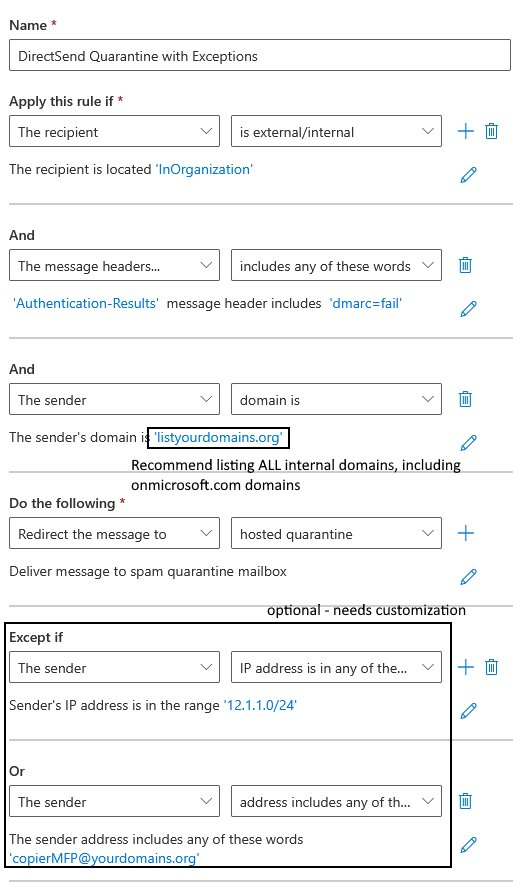
1) Make sure you add all your internal domains to this rule!
2) Make sure you add your IPs/Rangeshere as well!
3) Finally, DO NOT lead in with sending messages straight to quarantine – consider escalating from:
a. Prepend subject/body
b. Set SCL to 9 (to move to JMF/Quarantine with notification)
c. Redirect to hosted Quarantine
Update 8/20/2025 – based on customer feedback we excluded Message Type of Meetings from this rule, since Gmail tenants don’t pass SPF and DKIM for meeting acceptances.
Enable blocking DirectSend with an Inbound Connector
If you audit using KQL and find legitimate emails, collect the sending IP addresses and create an Inbound connector in EXO using these IPs as the source. Then once you confirm in Explorer that the connector is in use, you could proceed with blocking DirectSend.
Blocking DirectSend Completely
If your audit found no results, and you feel 30 days of data is sufficient to make the decision to turn off DirectSend, here is the command to disable DirectSend:
The EXO PowerShell command is:
Set-OrganizationConfig -RejectDirectSend $true
[UPDATE 9/10/2025]: If you experience an error message “Unable to find type [short]” then it is likely related to your version of PowerShell. TL;DR you need to upgrade to PowerShell version 7. (Reference here)
Once implemented, senders will get NDRs that state:
550 5.7.68 TenantInboundAttribution; Direct Send not allowed for this organization from unauthorized sources
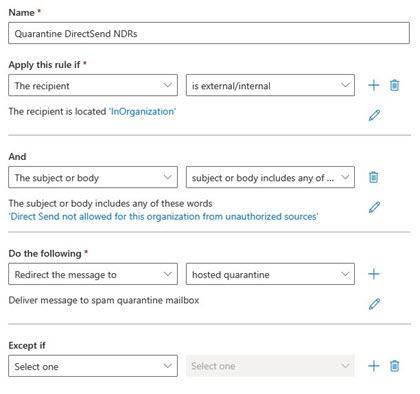
Now, a new problem COULD appear after blocking – since one of the hallmarks here is sending to and from the user, your users could see this NDR. Annoying. If this occurs, here’s a simple EXO ETR to quarantine these confusing outcomes.
 The Cloud Technologist