
Since I last wrote about Microsoft Security Copilot Microsoft Copilot for Security (CFS) (here) on launch day (April 1st 2024) – and there have been several improvements but the product does not generated accurate results (the KQL syntax is still flawed, which would require a master KQL expert to recognize).
Positive Improvements
1. Initial Setup took 3 seconds instead of 5 minutes. To get started just fill out the form here: https://securitycopilot.microsoft.com/tour/admin
Like, there is no technical hurdle to immediately begin testing.
AND, you can easily delete CFS when you are done without being on the hook for paying for the entire month. Start testing now!
2. No more throttling in XDR Portal (Security.Microsoft.com) during the first hour. I couldn’t get the throttle to fire during the first 60 minutes even though I consumed the equivalent of about 6 CSU Units. So in other words, this product is now usable during the first hour.
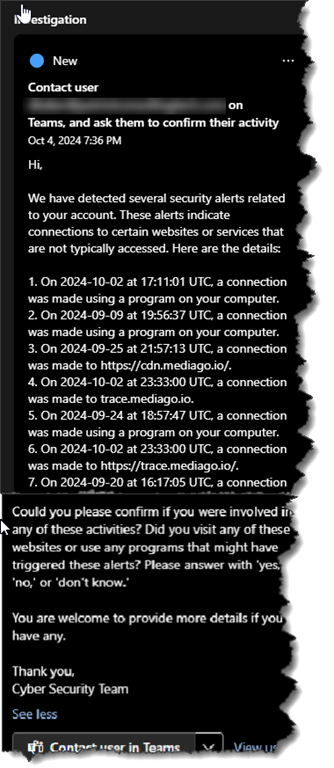
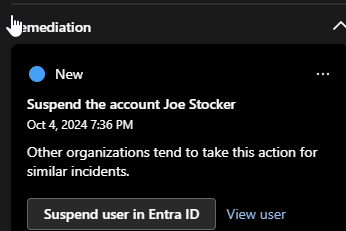
3. Guided Response includes several (helpful) pre-canned actions that save time including:
Isolate Device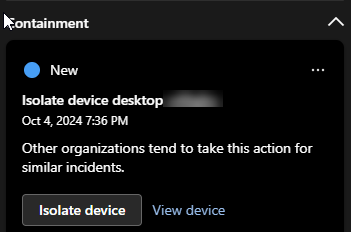
Contact User in Teams
Reset Password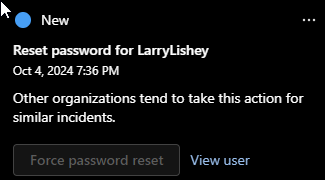
Suspend or Disable User
Complaints
1. During hour #2, the throttle kicked in almost immediately. In order to make the usable for my standards, I would need 6 CSU’s which is about $17,000 per month. As a business owner, I would rather spend that money on human SOC analysts.
2. The KQL syntax generated in Advanced Hunting is still not accurate, and this is the biggest reason why I cannot recommend CFS to Level 1 SOC Analysts at this time.
In one example, I asked “find all failed logins in the last 24 hours and determine if they are anomalous. for example, are they from a normal device ID or normal IP addresses used in the past successful logins?”
The KQL that it generated failed to factor anything related to device ID:
let FailedLogins = SigninLogs
| where TimeGenerated > ago(24h)
| where ResultType != 0
| project TimeGenerated, UserPrincipalName, Id, IPAddress, ResultType;
let HistoricalSuccessfulLogins = SigninLogs
| where ResultType == 0
| project Id, IPAddress;
FailedLogins
| join kind=leftanti (
HistoricalSuccessfulLogins
) on Id, IPAddress
| project TimeGenerated, UserPrincipalName, Id, IPAddress, ResultType, IsAnomalous = “True”
Another example, I asked “write a kql query that shows all emails user ____ sent to external recipients on 9/30/2024.”
The syntax it provided resulted in 5 emails shown. When I looked for actual emails sent, there were 17.
For example here is the incorrect syntax that CFS generated:
EmailEvents
| where SenderDisplayName == “Jane Doe”
| where Timestamp between(datetime(‘2024-09-30T00:00:00Z’) .. datetime(‘2024-09-30T23:59:59Z’))
| where isnull(RecipientObjectId) or isempty(RecipientObjectId)
| project Timestamp, SenderDisplayName, RecipientEmailAddress, Subject
| count
// Results = 5
Here is the actual valid syntax:
EmailEvents
| where SenderDisplayName == “Jane Doe”
| where Timestamp between(datetime(‘2024-09-30T00:00:00Z’) .. datetime(‘2024-09-30T23:59:59Z’))
| where RecipientEmailAddress !endswith “(my company domain name)”
| count
//Results = 17
 The Cloud Technologist