Author Archives: Joe Stocker

Top 3 reasons I should have adopted Outlook App for iOS a long time ago


1. Send Availability

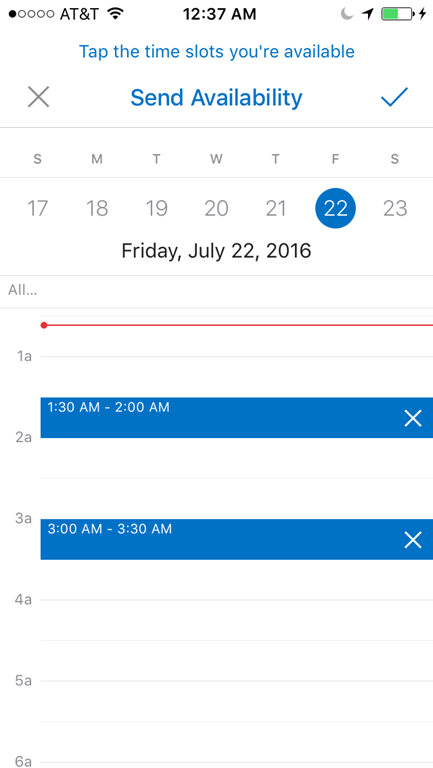
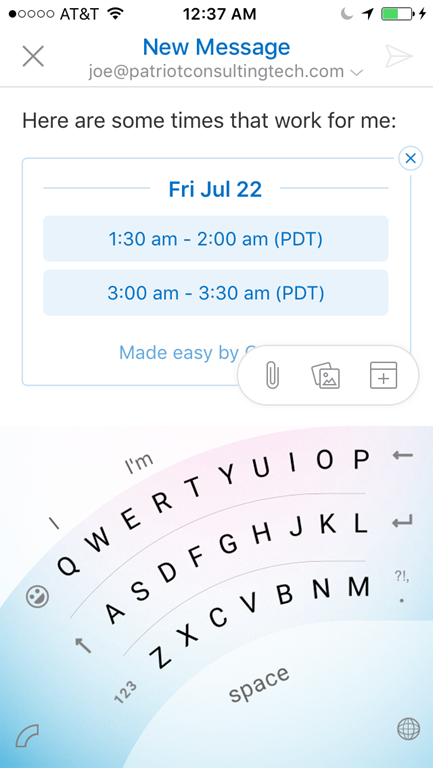
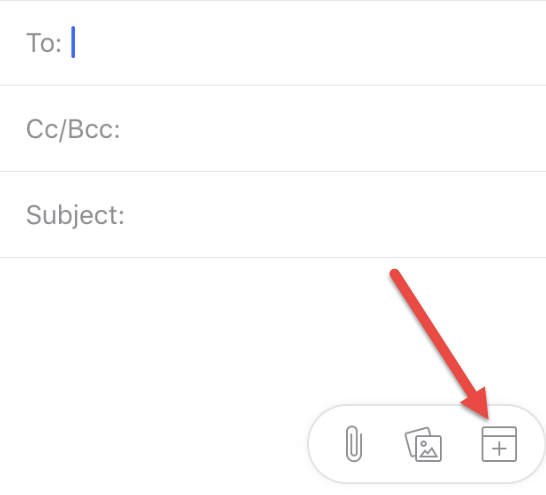
How often do we get an email like “are you available to meet tomorrow.”  Now, when I reply, I can click a button and select available time slots, and with one more button press, I can quickly send my availability! In this manner, it is actually more efficient than the current Outlook full client!  The closest thing we have to this in the full Outlook  client is the  ‘FindTime’ app in Outlook.

imageIMG_0035IMG_0036


2. Attach Files or Photos while composing email

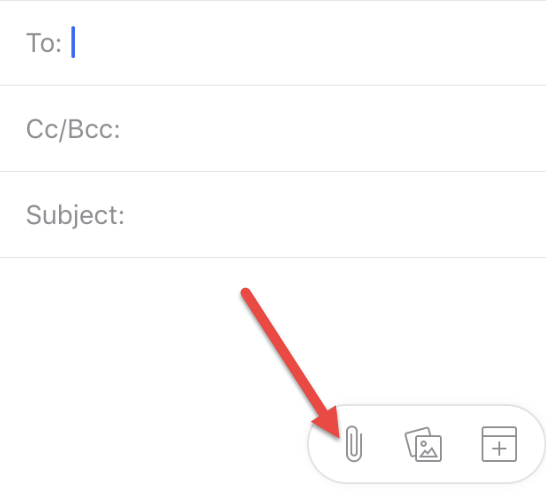
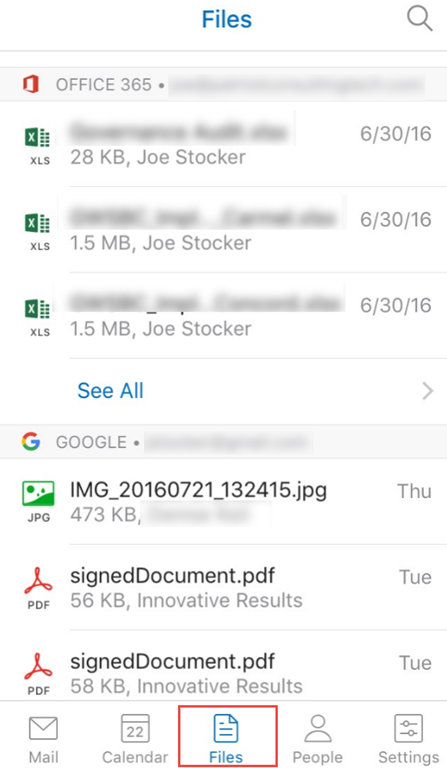
This is a huge advantage over the native iOS mail client, I still remember when I used an iPhone for the first time and could not find any way to attach a file to an email I was drafting. My friend snickered, “that’s because you have to go to the photo first, then click share, then draft your email.” Hmmm.. okay… I guess but that wasn’t completely obvious to me. So I love the more natural ability to attach a file after I start composing a new email. What I like even more is that it shows me files that have recently been sent to me in email, as well as files I have in my OneDrive (and other storage providers too).

imageSNAGHTML124db2f0

3. Consume RMS protected attachments sent from “RMS sharing app”

One of the main obstacles for adoption of RMS is the lack of support for it on mobile devices. Now, with the Outlook App for iOS, I can open RMS protected content when it is sent from the RMS Sharing App.  What doesn’t work is opening RMS protected email messages although it is apparently supposed to work according to this article (here). Perhaps it is a bug in the latest iOS client since it is listed as being a supported feature.

IMG_0030

No Significant Drawbacks

One of the features I liked about the native mail client in iOS is the ability for multiple mail accounts to be added (for example, the ability to quickly check both business and personal email accounts). Happily, this feature works the same in Outlook App for iOS,, and I have not found any other productivity loss.

I have occasionally come across a few instances where the Outlook App for iOS is not detected as a mail client, for example, in Safari it was not one of the default actions when I needed to forward a URL via email. I was able to easily add it to the Safari quick actions, so that wasn’t too difficult. I think there was one other native app that was looking for an account registered as a native account, which I no longer have, so it failed to work. Other than that one drawback, I am very happy with the new productivity enhancements I have gained.

So I have switched from using the native mail client in the iOS to using the Outlook App for iOS and so far I am only wishing I made this switch earlier!

AutoMapping stuck after mailbox migration

After migrating a mailbox to Office 365 Exchange Online, if the mailbox previously had full access permissions prior to the migration, then after the mailbox migration is finished the user may receive lots of authentication prompts. This happens by design since cross-forest permissions are not supported. Mailboxes that require full-access and/or send-as permissions should be migrated together in groups to avoid this issue.

But what happens if someone overlooks this requirement and moves a mailbox without moving the shared mailboxes along with it? This is where it gets very interesting. While it is possible to remove the full-access permission from the on-premises mailbox, that change won’t sync or take any effect and doesn’t solve the issue. Likewise, migrating the mailbox to Office 365 with the permissions removed prior to the shared mailbox migration won’t solve the problem (you might expect the original mailbox to see the newly migrated mailbox and that it no longer has full-access, and that would be enough to remove the AutoMapping feature). However, no, that is not how it works. To remove the auto-mapped shared mailbox, you have to migrate the shared mailbox, add the full access permission, then remove it again. That triggers the delegate’s outlook to remove the shared mailbox from the left navigation in Outlook.

Skype for business Event ID 1047 LS File Transfer Agent

During a deployment at a customer site I ran into a problem with SkypeFB Edge replication.

After adding the Edge to the topology, installing the role on the server and proper certificates, replication was failing with Event ID 1046 and Event ID 1047.

The solution was to add the following registry key:

  1. Open Regedit on the Edge server
  2. Go to HKLMSYSTEMCurrentControlSetControlSecurityProvidersSCHANNEL
  3. Right click and add the DWORD (ClientAuthTrustMode)
  4. Set the value of the DWORD to 2
  5. Restart the server
  6. On the front-end run this command and then wait 2 minutes
    invoke-CSManagementStoreReplication

Additionally, when working with Microsoft support they also recommended creating these two additional keys:

SendTrustedIssuerList (Value 0) and EnableSessionTicket (Value 2).

References:

https://lyncdude.com/2015/09/23/skype-for-business-event-id-1047-ls-file-transfer-agent/

and

https://social.technet.microsoft.com/Forums/lync/en-US/19e2d5f0-5d3f-4c2f-a8ea-b0a851bb30ac/file-transfer-agent-cannot-get-replication-status-from-replica-replicator-agent-on-edge-eventid-1047?forum=sfbfr

There is an interesting troubleshooting article with tracing presented here that could also solve the problem if it was caused by a missing intermediate authority.

https://ocsguy.com/2011/09/07/troubleshooting-cms-replication/

And while researching this problem, I came across a very thorough article on this topic that is worth translating into English: http://www.msxfaq.de/signcrypt/win2012tls.htm

Skype for Business Services won’t start

Immediately after installing Skype for Business Server 2015 (Standard Edition) the front-end services would not start.

Tom Rimala’s blog article that suggested there is a problem when the internal Certificate Authority uses MD5 as the signature signing method.

Also, the Microsoft Certificate Requirements says “The default digest, or hash signing, algorithm is RSA.” (no mention of MD5).

I changed the CA Authority’s certificate from MD5 to SHA1. Here is the registry key to change on the Root CA signing information (we changed these three values). Note: the guidance was to change this on the Root and Subordinate but in our case the Root was also the issuing CA, so there was no subordinate to change in our case.

image

The next step is to restart the Root CA services. Then issue a new Root Certificate. Then copy the new root CA cert to the Skype for Business front-end, and finally re-issued the Front End Cert and OATH cert. Then the services should start up.

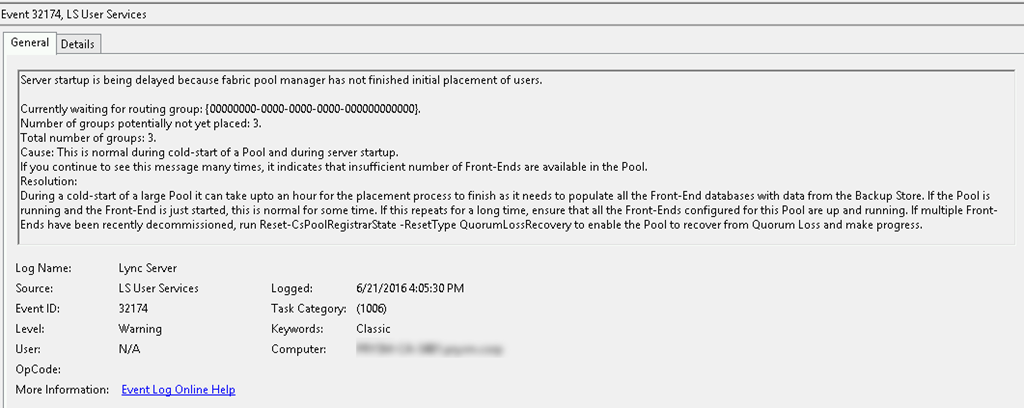
There was a false negative warning about Event ID 32174 “Server startup is being delayed because fabric pool manager has not finished initial placement of users.” This is clearly a bogus error because a Front-End server doesn’t have additional servers to place users into.

SNAGHTML253351b

There was a clue about the Certificate problem because the System Event log contained a ton of Schannel events such as 36888, “A fatal alert was generated and sent to the remote endpoint. This may result in termination of the connection. The TLS protocol defined fatal error code is 40. The Windows SChannel error state is 1205.” And Event ID 36874 “An TLS 1.2 connection request was received from a remote client application, but none of the cipher suites supported by the client application are supported by the server. The SSL connection request has failed.” I am adding these details in the event that a search engine might index these errors to point people to this fix.

Skype for Business Online Delegate Calendar Scheduling

Imagine a scenario where an executive assistant needs to schedule Office 365 Skype for Business Online meetings on behalf of at least two or more executives during the same timeframe.

Without proper training, the assistant may schedule meetings in their own calendar rather than in the calendar of the executives. This can be a major problem if those two meetings need to occur at the same time, because SFB Online does not yet support dynamic meeting ID’s, so you can’t have two meetings scheduled at the same time by the same meeting organizer.

The solution is to schedule the meeting on behalf of the executive, so that they appear as the meeting organizer, and the meeting will use their meeting ID rather than the assistant.

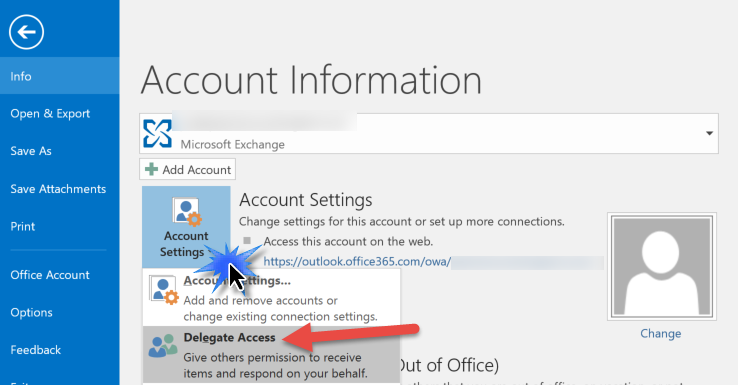
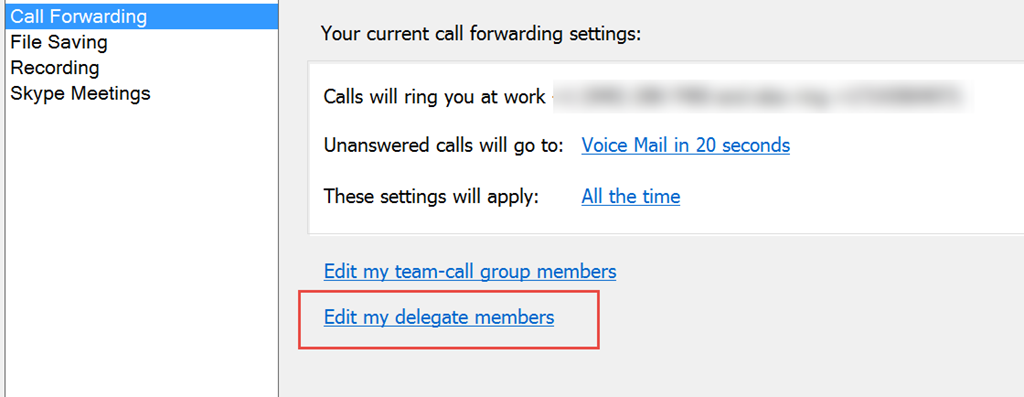
To accomplish this, the executive needs to perform delegation to the assistant in two separate products (Outlook and Skype for Business):

1. Outlook Delegation

SNAGHTML84b89

2. SFB Delegation

SNAGHTML625da

SNAGHTML90b8d
*If you don’t see the Call Forwarding Settings then you don’t have the required license assigned (see license requirements below).


License Requirements (for SFB Online)

The second can be tricky if the minimum required licenses are not assigned. The Executive/Manager needs one of these three license combinations for delegated meetings to work correctly:

1. SFB Online Plan 3

2. SFB Online Plan 3 + Cloud PBX

3. SFB Online Plan 2 + Cloud PBX + PSTN Calling

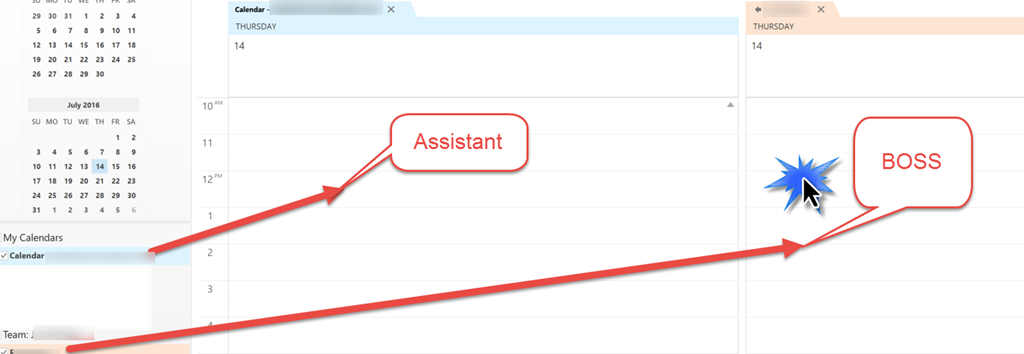
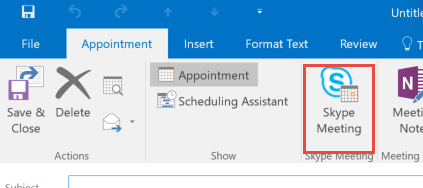
Then the delegate simply needs to double-click on the boss’s calendar inside outlook to create a new Skype Meeting.

SNAGHTML34c3687

image

Top 10 tips to bolster enterprise email security


The FBI issued an alert on April 4th that CEO Fraud (a form of Spear-phishing) is on the rise, and companies have already reported losses of 2.3 Billion dollars. Mattel made headlines for falling prey to CEO Fraud, when an employee sent a wire transfer of 2 million dollars to a bank in China. 

Other forms of spear-phishing attacks are on the rise, spreading ransomware variants like cryptowall. Surveys have shown that 30% of employees will open these types of emails. The ransoms paid in 2015 have amounted to a 500 billion dollar industry for cyber criminals.

A recent report from Trend Micro revealed that 81% of data breaches originated from phishing attacks. Therefore, email security should be a top priority for companies to protect themselves from these threats.

Here are my top 10 tips you can do to protect your company from these threats.

  1. Have employees participate in Security Awareness Training
  2. Phish your employees and train the ones who click on the false links
  3. Maintain regular backups offline. This may be your last line of defense if an employee or server becomes infected with ransomware.
    Note: Cloud based backups may be targeted, so traditional off-site rotation may need to be brought back for many companies who have switched to Disk to Disk only solutions.  Consider WORM drives to write to, (write once, read many) so that the original backup cannot be overwritten by cryptolocker type variants.
  4. Keep systems patched regularly. This reduces the surface attack area for advanced persistent threats (APT) to spread into your network.
  5. Block Executables at Mail Filter. This can prevent some forms of ransomware from coming into your environment.
  6. Implement DMARC to prevent spear-phishing attacks that pose from trusted executives. My how-to guide for implementing DMARC is here.
  7. Implement Zero Day email security protection solutions like MSFT ATP
  8. Implement application white-listing Solutions like Carbon Black (formerly known as Bit9) or Cylance
  9. Hide file shares, ex: \\server\share$. This prevents ransomware from scanning and finding file servers on the network.
  10. Replace Mapped Network Drives with shortcuts on Desktop to shared drives. This too can prevent ransomware from spreading. Implement principle of least privilege so that ransomware is limited to what it can write to.

Honorable mentions:
Cryptolocker Prevention Kit “The kit includes an article on cleaning up after infection but more importantly provides materials and instruction for deploying preventative block using software restriction policies. The articles provide instruction for installing them via GPO on domain computers and terminal servers, and non-domain joined machines too. We have also provide GPO settings that you can important into your environment.”
Individual Windows users should check out CryptoPrevent, a tiny utility from John Nicholas Shaw

You may have noticed that removing users from local administrator is not listed in the top 10. This is because CryptoLocker variants can execute without local admin privs.

How to stop email spoofing using DMARC

Did you know that 91% of successful data breaches started with a spear-phishing attack? (According to research from Trend Micro).

Two of my customers have informed me that their top executives’ email have been ‘spoofed’ by hackers. I have included the message headers from those spoofed emails in the blog post below (scrubbing the names to protect the innocent).

The hackers are exploiting a weakness in the Simple Mail Transport Protocol (SMTP) to masquerade themselves as a top executive, who then send an urgent email to staff to click a hyperlink or open an attachment. You can imagine what happens next: the computers get infected by Ransomware like CryptoLocker, encrypting not only hard drives, but also entire departmental file shares. Check your backups – this may be your only option to recover data that has been encrypted. The latest variants of ransomware are now trying to erase network connected backup storage too – so be extra vigilant to keep an offline copy of your backups.  

So when my customers asked me what they can do to prevent email spoofing,  I asked for a copy of the message headers that the attackers used and found out that the emails were getting through despite failing Sender Policy Framework (SPF) checks. SPF checks are the most common method to combat email spoofing. In this article I will describe how DMARC can better enforce your SPF record values to prevent spoofed email from passing through. I recently did a survey of 200 companies and found that only 12% have implemented DMARC so far. 

SPF is implemented by creating a type of DNS record called a ‘TXT’ that contains an authorized list of senders for that particular email domain. However, many companies have not implemented the most hardened syntax for the SPF record, known as the hard fail “-all.” Instead, they are implementing the soft fail “~all.” This allows for emails that do not match the authorized list of servers to pass through, albeit with a higher spam confidence level (SCL) score. 

Up until recently, it seemed as if SPF was all that was required to cause email filters to adjust the SCL high enough to cause spoofed emails to go into a quarantine or junk mail folder. All that started to change when the attackers started to use valid email servers hosted by trusted email providers such as GoDaddy. This caused the SCL score to be low enough for the email to pass through as legitimate “enough” to look like a standard email.

Additionally, and probably more significantly, hackers are now spoofing the RFC 5322.From header which cannot be detected by an SPF check. SPF is great for protecting against attacks where the 5321.MailFrom header is spoofed. Where SPF has problems is when the 5322.From header (the address that you see in Outlook).

Scroll down to see the (scrubbed) message headers in detail.

How do we stop spoofed emails?

Enter DMARC, which stands for “Domain-based Message Authentication, Reporting & Conformance”, is an email authentication protocol. It builds on the widely deployed SPF and DKIM protocols, and was submitted as RFC 7489 on March 18th 2015.

In a nutshell, DMARC is another type of DNS TXT record that builds on SPF and DKIM records and can be configured to specifically tells email filters to reject emails that did not originate from the senders authorized from the SPF or DKIM records. This is enough to stop spoofed emails cold in their tracks. Here is an example of a DMARC record:

v=DMARC1; p=quarantine; rua=mailto:[email protected] 

What this does is to send items to quarantine if the SPF record or DKIM checks fail, and to send reports to an email address that you specify. 

Prior to implementing a DNS record type for DMARC, it is important to talk to your marketing department for a list of companies that they send emails through, for example MailChimp. Those services must be in the SPF record otherwise they will be rejected. After the SPF has been updated, the hardfail setting should be changed to “-all” and the DMARC setting should be configured to reject. Organizations that aren’t sure which services their marketing companies are using can enable DMARC in monitoring mode so that they can first learn who is sending emails out. 

To test out your email system, you can send emails to these addresses and get a report back:

1. If you wish to receive the results at the address in the “mail_from,” the sample message should be sent to [email protected].

2. If you wish to receive the results at the address in the “from” header, the sample message should be sent to [email protected].


Disclaimer: All content provided is for informational purposes only. Use at your own risk. 

Message Header Analysis

Take a look at these two spoofed message header (names have been changed to protect the innocent): 

First Example – Spoofed email originating from GoDaddy

Authentication-Results: spf=permerror (sender IP is 184.168.200.142)
smtp.mailfrom=contoso.com; contoso.com; dkim=none (message not signed)
header.d=none;contoso.com; dmarc=none action=none header.from=contoso.com;
Received-SPF: PermError (protection.outlook.com: domain of contoso.com used an
invalid SPF mechanism)
(envelope-from <[email protected]>)
From: (Real CEO’s Full Name) [email protected] <– RFC 5322.From
To: (Unsuspecting End-User – Probably in Accounting Department) <[email protected]>
Subject: Let Me Know Asap!!
Reply-To: <[email protected]> (Attacker’s address, or unsuspecting innocent 3rd party)
Mail-Reply-To: [email protected] (Attacker’s address, or unsuspecting innocent 3rd party)
X-Sender: [email protected]
X-AntiAbuse: Primary Hostname – p3plcpnl0222.prod.phx3.secureserver.net
X-AntiAbuse: Original Domain – contoso.com
X-AntiAbuse: Sender Address Domain – contoso.com
X-Get-Message-Sender-Via: p3plcpnl0222.prod.phx3.secureserver.net: authenticated_id: noreply@(LegitimateEmailDomainAtGoDaddy)
Return-Path: [email protected]

Second Example – Spoofed email originating from POBOX.com

Return-Path: <[email protected]>
X-Env-Sender: [email protected]
X-SpamWhitelisted: domain whitelist
X-StarScan-Version: 8.11; banners=contoso.com,-,contoso.com
X-VirusChecked: Checked
Received: (qmail 121067 invoked from network); 21 Mar 2016 16:38:30 -0000
Received: from pb-sasl-trial1.pobox.com (HELO pb-sasl-trial1.pobox.com)
DHE-RSA-AES256-GCM-SHA384 encrypted SMTP; 21 Mar 2016 16:38:30 -0000
Received: from pb-sasl-trial1.pobox.com (localhost [127.0.0.1]) by
pb-sasl-trial1.pobox.com (Postfix) with ESMTP id 8D0A21017B for
<[email protected]>; Mon, 21 Mar 2016 12:38:30 -0400 (EDT)
DKIM-Signature: v=1; a=rsa-sha1; c=relaxed; d=pobox.com; h=mime-version
:content-type:content-transfer-encoding:date:from:to:subject
Received: from pb-wm-sasl1.int.icgroup.com (pb-wm-sasl1.int.icgroup.com
[10.80.80.58]) by pb-sasl-trial1.pobox.com (Postfix) with ESMTP id 7F0521017A
for <[email protected]>; Mon, 21 Mar 2016 12:38:30 -0400 (EDT)
Received: from webmail.pobox.com (unknown [10.80.80.19]) (using TLSv1.2 with
cipher ECDHE-RSA-AES256-GCM-SHA384 (256/256 bits)) (No client certificate
requested) by pb-wm-sasl1.pobox.com (Postfix) with ESMTPSA id 0A27539EC9 for
<[email protected]>; Mon, 21 Mar 2016 12:38:30 -0400 (EDT)
Date: Mon, 21 Mar 2016 17:38:29 +0100
From: Real CEO’s Full Name [email protected] <– RFC 5322.From
To: <[email protected]>
Subject: Invoice Payment
Reply-To: <[email protected]> (Attacker’s address, or unsuspecting innocent 3rd party)
Mail-Reply-To: [email protected] (Attacker’s address, or unsuspecting innocent 3rd party)
X-Sender: [email protected]
User-Agent: Roundcube Webmail/1.1.1
X-Pobox-Relay-ID: 57FC50A6-EF83-11E5-B2BA-E24DCCAB2AED-19029152!pb-wm-sasl1.int.icgroup.com.pobox.com
X-MS-Exchange-Organization-AuthSource: RealExchangeServerHostName.contoso.com
X-MS-Exchange-Organization-AuthAs: Anonymous

And here is how authentic the email would look to the recipient:

—–Original Message—–
From: Real CEO’s Full Name [mailto:[email protected]]
Sent: Monday, March 21, 2016 9:53 AM
To: (Unsuspecting End-User – Probably in Accounting Department) <[email protected]>
Subject: RE: Invoice Payment

Jane,

I need you to process an urgent payment, which needs to go out today as a same value day payment. Let me know when you are set to proceed, so i can have the account information forwarded to you once received.

Awaiting your response.

Regards
Thanks.


Sent from my iPad

I am in the office today.

—–End Original Message—–

O365 and DMARC

Because SPF fails, and because DKIM can fail, and because this is all due to routing, EOP will not enforce DMARC failures if your primary MX does not point to EOP. EOP can still detect if a message passes DMARC when the DKIM-signature passes.

https://blogs.msdn.microsoft.com/tzink/2014/12/03/using-dmarc-in-office-365/

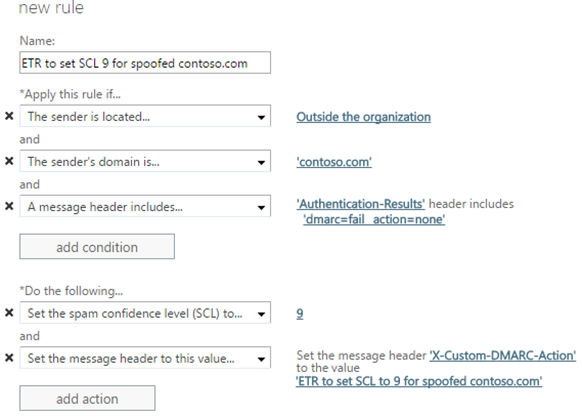
For Office 365 customers, if you do not set the DMARC value to p=reject, then it is recommended to create a message transport rule to set the spam confidence level to 9 so that it doesn’t hit the user’s inbox. The advantage of this is that your domain cannot be spoofed by outside senders for inbound messages to your organization which is common in spear phishing, yet marketing messages that go over the Internet are not affected.
image

Summary

In the first example, the email passed through the Exchange Online Protection filters. In the second example, the email was passed through MessageLabs filters. In the second example, since there was no hyperlink or attachment, we can only assume that the reply TO address was the attacker’s actual email address. Whereas in the first example, the reply TO address was forged because the attacker only wanted the recipient to click on a hyperlink.

After implementing DMARC, the message header section “Authentication-Results”  will contain instructions to reject both of these emails.

Dmarc relies upon SPF *or* DKIM. So if you can’t do outbound DKIM signing, you can still enforce DMARC on an SPF hard fail to prevent inbound mail from coming through as spoofed.

Advanced Threat Protection from compromised Vendors

DMARC provides an excellent layer of defense to add to your defense in depth security policy, preventing spoofed mails from reaching your internal users. For situations where an attacker is not spoofing your domain, but is instead spoofing one of your trusted Vendors domains, DMARC would have to be implemented by your Vendor before it would protect you. In the trusted Vendor scenario, you can best protect yourself by adding an advanced layer of protection to scan for phishing hyperlinks and zero-day vulnerabilities that are not yet in virus definition files. One such solution is Microsoft Advanced Threat Protection (ATP). ATP will detonate attachments in a cloud-hosted virtual machine and observe it for malicious intent before delivering it to your end-users. It will also replace Hyperlinks with ‘safe links’ which are scanned at the time the user clicks on the hyperlink. For more information on Advanced Threat Protection, or to schedule a free consultation to have Patriot Consulting configure it in your Office 365 tenant free-of-charge, contact us at [email protected].

References

Demarc Deployment Tools, Generators and Checks: ttps://dmarc.org/resources/deployment-tools/

For more information on DMARC, check out www.dmarc.org

www.dmarc.org

https://dmarc.org/wiki/FAQ#How_does_DMARC_work.2C_briefly.2C_and_in_non-technical_terms.3F

https://blogs.technet.microsoft.com/eopfieldnotes/2015/02/26/using-dmarc-to-prevent-spoofing/

https://blogs.msdn.microsoft.com/tzink/2014/12/03/using-dmarc-in-office-365/

https://blogs.msdn.microsoft.com/tzink/2015/03/03/best-practices-for-exchange-online-protection-customers-to-align-with-dmarc/

https://blogs.msdn.microsoft.com/tzink/2015/03/13/how-to-align-with-spf-and-dmarc-for-your-domain-if-you-use-a-lot-of-3rd-parties-to-send-email-as-you/

Simple Bulk Licensing Script for Office 365

I am sometimes asked for a very simple PowerShell script that can be used to apply licenses to Office 365 users in bulk. This is handy when you have a large amount of users who need to be assigned a license, for example, an Exchange Online license.

The bulk licensing script is available for download from Script Center Gallery on TechNet here:

https://gallery.technet.microsoft.com/scriptcenter/Simple-Bulk-Licensing-99e6d8c8

Prerequisites:

Azure AD Module for PowerShell

Need help with your next Office 365 Project? We can help you deploy any or all of the 21 features Included in Office 365 for a flat rate per month.  Contact us at [email protected].

Top five reasons to consider Azure DNS

Azure DNS was first announced at the Microsoft Ignite conference in Chicago in May of 2015. I was there in the conference session when it was announced, because I confess – I love DNS. In this blog post I will provide some criteria that can help you determine whether Azure DNS is right for your external DNS zones. Warning: This is a 300 level article – if you do not have an intermediate understanding of DNS, I recommend first reading this article (here).

Since Azure DNS was announced almost 12 months ago, the only administration interface for Azure DNS was PowerShell. This limited the early adoption of Azure DNS to hyper enthusiasts (like myself) or people who look for any excuse to use PowerShell (you know who you are!). Microsoft announced today that Azure DNS can now be managed in the new Azure Portal, which is now sure to increase interest and adoption of this service.  So if you are managing your DNS today, why switch to Azure DNS?  Here are a few principles that I suggest for guiding this decision:

  1. Are your external DNS zones hosted on an unsupported version of Windows Server? If so, then this would be an opportunity to migrate to a supported solution. I have witnessed many environments where external DNS is running on Windows 2003 and even Windows 2000. The scary thing is these are internet-facing services, and since these operating systems are no longer receiving security updates, this could be an open door for hackers or worms to infiltrate into the environment.
  2. Are all of your external DNS servers in the same physical location? If so, then Azure DNS provides an opportunity to migrate to a more resilient solution since Azure DNS is automatically load balanced across multiple regions.
  3. Have you heard of a routing technique called Anycast? Unless you have deployed your own external DNS infrastructure across the world, it will be hard to beat the performance that Azure DNS offers because of its implementation of “Anycast.” DNS queries automatically route to the closest name servers for the best possible performance. And this translates into better application performance since application latency won’t be waiting on DNS responses. For a nice PDF of how Anycast works (click here).
  4. Does the idea or need to programmatically create DNS records in PowerShell downright excite you? Then Azure DNS is for you. Get your geek on with this nice walkthrough by Alexandre Brisebois. Just. Because. You. Can. https://alexandrebrisebois.wordpress.com/2015/06/11/moving-to-azure-dns/
  5. Do you need very short TTL values? Some DNS providers like Network Solutions will not allow you to create a record with anything less than a 60 minute TTL. They do this because they do not charge you by query, so they would prefer to have less DNS traffic hitting their network. Microsoft, on the other hand, charges by individual query, so it benefits them to offer low TTL values, since every time the record expires from DNS cache, that results in another query and therefore more $$ to MSFT. Smart.

image

Pricing

Azure DNS is currently in preview and prices below reflect a 50% preview discount

image

https://azure.microsoft.com/en-us/pricing/details/dns/

Tips

  • Use DNSStuff.com to create a baseline of your current DNS performance before considering switching to Azure DNS. Then run the same report after you switch to see if performance improved favorably.
  • Configure TTL values of 3600 (60 minutes)  to keep the DNS queries low and therefore your price low. Lower TTL values will give you greater flexibility to quickly redirect traffic to another host, with the tradeoff of increased cost.

Limits

Contact Support if you need the limits below increased. These are the limits during preview, so they may change when Azure DNS reaches general availability.

image

https://azure.microsoft.com/en-us/documentation/articles/azure-subscription-service-limits/#dns-limits

Definitions

– A record set is two records with the same name. For example, two A records with the name ‘WWW’ pointing to two separate IP addresses is a single record set. You can have up to 20 ‘WWW’ records in a single record set.

– A record is a type of DNS entry such as ‘A’ ‘MX’ ‘CNAME’ ‘TXT’ ‘SRV’ and so on. You can have up to 1000 records per Azure DNS zone.


Getting started with Azure DNS

Disclaimer: DO not proceed on a production DNS zone –> this service is in Beta and the information below is for educational purposes only for LAB/Testing environments. Use at your own risk.

1. Create your new Zone in Azure DNS first.

image

SNAGHTML3e22816

2. Create DNS Records in your new zone

image

You can use the new GUI method when you have just a single record to update, but when you want to do bulk administration, . First, you have to have the right PowerShell modules installed and then logon to your Azure Tenant: https://azure.microsoft.com/en-us/documentation/articles/dns-getstarted-create-dnszone/

Then once you have powershell connected, a minimum of three lines of code are required to create a single record in your DNS zone. For example, to create an A record for WWW to point to 1.1.1.1, you would run these three commands:

$rs = New-AzureRmDnsRecordSet -Name “www” -RecordType “A” -ZoneName “contoso.com” -ResourceGroupName “Website” -Ttl 3600

Add-AzureRmDnsRecordConfig -RecordSet $rs -Ipv4Address 1.1.1.1

Set-AzureRmDnsRecordSet -RecordSet $rs
For more information on the PowerShell syntax, see: https://azure.microsoft.com/en-us/documentation/articles/dns-getstarted-create-recordset/

TIP:  If you were previously hosting your DNS zone on Godaddy, you can export your zone to a file for easy importing into Azure.

SNAGHTML3d328bb

5. When you are happy with your Zone then you are ready to point the world at it. This is done through Delegation. Read: “Delegate your domain to Azure” here for more info:
https://azure.microsoft.com/en-us/documentation/articles/dns-domain-delegation/

For example, in Godaddy, this is done in the Manage DNS and Settings tab > Manage.

image

These name servers can be found in your new Azure DNS settings here:

SNAGHTML3e520b5

Summary

Azure DNS is still in preview, so Microsoft’s official recommendation is to wait until it reaches the generally available milestone before migrating production zones onto it. However, if you think you would benefit from it, you can begin experimenting with it now to gain familiarity with it.

Often, hosting external DNS with your DNS registrar is free, but it may not always have the best performance. For example, when I queried the authoritative name servers for my DNS records, I received a 100ms TCP response. After switching to Azure DNS, queries against my DNS zone improved to 50ms! Therefore, Azure DNS might be worth the price when you consider the reduced latency in DNS lookups for your domain name, or the increase high availability compared to hosting it yourself.

Changes to Azure AD Connect Sync Scheduler

The latest builds of Azure AD Connect, beginning with (build 1.1.105.0 Feb 2016) no longer rely on the Task Scheduler for scheduling when the directory sync runs.

Also, the default interval has changed from 3 hours to 30 minutes.

What’s really interesting is that Microsoft is now communicating that the most frequent interval that synchronizations can occur is now 30 minutes. You can try setting it to a lower value but the ‘CurrentlyEffectiveSyncCyleInterval’ shows you that they are ignoring you and setting it at the ‘AllowedSyncCyleInterval’ value of 30 minutes (see screen shot).

image

There is also a new method for manually forcing a sync: If you need to manually run a cycle, then from PowerShell run Start-ADSyncSyncCycle -PolicyType Delta.  To force a full sync type Start-ADSyncSyncCycle -PolicyType Initial

The previous methods for forcing a sync were running the task scheduler or using DirectorySyncClientCmd.exe. In earlier versions it was using Start-OnlineCoexistenceSync. So depending on the version of Dirsync, there could be at least three different methods to force a sync. This blog article (here) by Rhoderick Milne [MSFT]  gives a good historical overview of the previous releases and methods of forcing a sync as it has changed a few times.

This does not apply to you unless you manually upgrade to the latest version or if you are a new customer and downloaded the latest version of Azure AD Connect.

The instructions and usage for the new scheduler are located (here).

I noticed that after running a full sync and several delta syncs, that the users in the portal show as ‘In the Cloud’ rather than the expected ‘Synced with Active Directory.’  I closed and re-opened my browser and then they showed the correct status of ‘Synced with Active Directory.’ So there appears to be a bug with the browser interface where it is caching the ‘Status’ column and not updating after a directory sync. Interesting! So if you encounter this, try closing and re-opening the browser.

Need help with your next Office 365 Project? We can help you deploy any or all of the 21 features Included in Office 365 for a flat rate per month.  Contact us at [email protected].